
Previous in this series:
- Part 1: The High-Stakes World of Retail Options Trading
- Part 2: SmartOptions’ Three Pillars
- Part 3: Market Analysis & Go-To-Market Strategy
MVP Prototype
SmartOptions MVP: Retail Trader User Journey
SmartOptions’ Minimum Viable Product (MVP) showcases the end-to-end user journey of a retail trader engaging with the SmartOptions platform for the first time.
 Meet Anna, a 23-year-old two years out of university. After working at an investment bank, she’s built up some disposable income and, like many in her demographic, has been captivated by stories of massive options gains circulating on social media. Curious, she notices a billboard advertisement for SmartOptions: “Trade Smarter. Not Harder.” Intrigued, she downloads the app, looking to learn before risking real capital.
FIGURE 17: Anna’s Billboard and App View

Note. Image of Ana from OpenAI(2024). Billboard and App from SmartOptions – conducted April 2025 by the SmartOptions Research Team
UI/UX 1: Onboarding
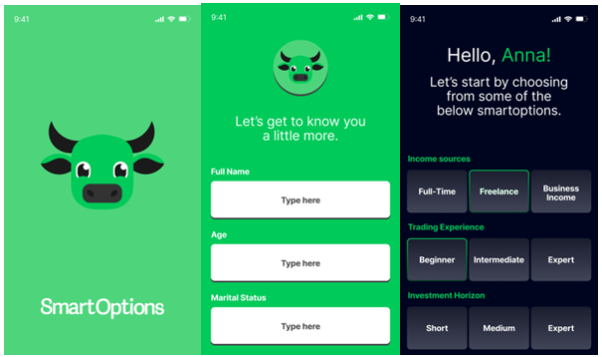
FIGURE 18: SmartOptions Onboarding UI/UX
Note. From SmartOptions – conducted April 2025 by the SmartOptions Research Team
Anna begins with a personalized onboarding experience designed to tailor the platform to her financial profile and risk appetite. SmartOptions’s onboarding gathers comprehensive user data, including demographic information, financial profile, risk tolerance, and trading experience. This directly aligns with our paper’s emphasis on personalization as a critical foundation, allowing tailored educational and strategic suggestions without crossing into regulated personalized advice.
UI/UX 2: Strategy Selection
Market Direction:
Anna is asked for her market outlook (bullish, bearish, neutral). It’s April 2025, and markets are in a freefall largely attributed to the President Trump administration’s aggressive tariff policies, which sparked fears of a global trade war and potential recession. The S&P 500 fell 5.75% for the month of March, marking its worst performance since December 2022. The S&P 500 is down sharply over the past two weeks, and Anna expects further declines. She selects “Bearish” as her market outlook. SmartOptions uses Anna’s input to recommend strategies aligned with her market view.
 Based on her bearish outlook, SmartOptions’ Trade Setup feature recommends an opportunity for Anna to trade options on Harley-Davidson (ticker: HOG), an American company heavily reliant on overseas suppliers for metals and parts. Aligned with her view, Anna is presented with two strategy choices: a Short Call or a Long Put. She decides to proceed with the Short Call option on HOG.
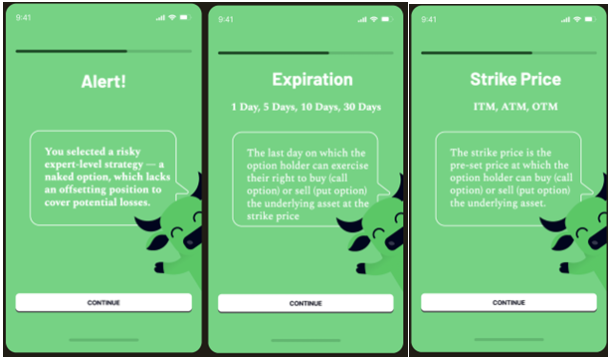
Before finalizing her trade, Anna receives a popup alert notification highlighting the increased risk associated with advanced strategies. To unlock real-capital trading for complex strategies, users must first complete successful simulated (“paper money”) trades and earn sequential “Seller” badge levels. After selecting her strategy, Anna is guided through the option trade parameters alongside educational insights.
Anna chooses to sell a call option with 5 days until expiration at the at-the-money strike price of $23. Since each option contract represents 100 shares of HOG, selling the $23 call for $2.88 per share earns her a total premium of $288 up front.
FIGURE 19: SmartOptions Strategy Selection UI/UX
Note. Image of Harley Davidson from OpenAI(2024). Alert, Expiration, and Strike Price screens from SmartOptions – conducted April 2025 by the SmartOptions Research Team
UI/UX 3: Payoff Diagram
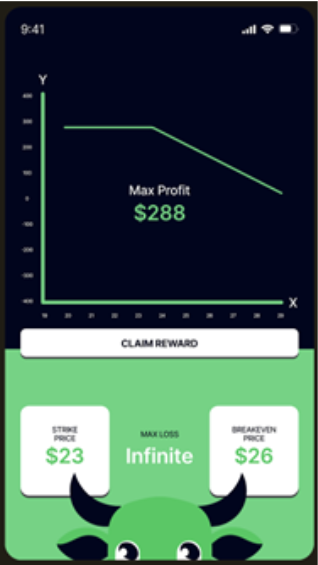
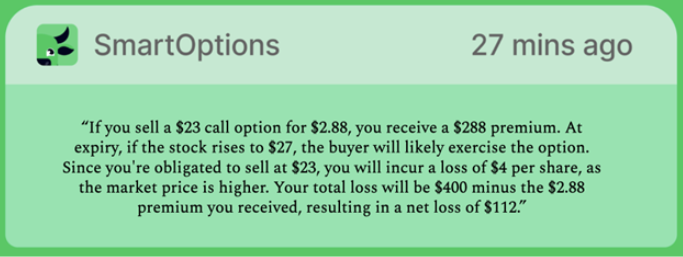
Anna views her interactive payoff diagram that visualizes her profit/loss potential across different market outcomes, including max profit, max loss, and break even points. Key elements of her Payoff Diagram include: Max Profit: $288, Max Loss: Infinite, Strike Price: $23, Breakeven Price: $26. Anna then receives an educational prompt providing her an example of a “what-if” scenario meant to help her understand the risks involved with her trade.
FIGURE 20: SmartOptions Payoff Diagram UI/UX
Note. From SmartOptions – conducted April 2025 by the SmartOptions Research Team
FIGURE 21: SmartOptions Payoff Diagram Push Notification
Note. From SmartOptions – conducted April 2025 by the SmartOptions Research Team
UI/UX 4: EOD Updates
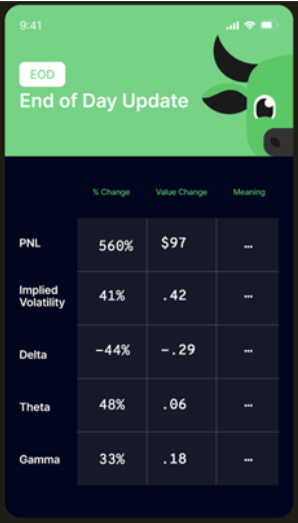
Option alerts simulate market reactions and end-of-day status, providing educational nudges about key option Greeks and market behaviors. Alerts are carefully worded to reinforce the educational nature of the platform and mitigate behavioral biases like panic selling or overconfidence. Anna receives simulated end-of-day and real-time trading alerts, preparing her for real market reactions. Her end-of-day report on April 8th reads:
FIGURE 22: SmartOptions Greeks EOD Update Alert
Note. From SmartOptions – conducted April 2025 by the SmartOptions Research Team
Anna clicks on the “Meaning” column to see more detailed explanations and insights, depicted below:
Profit and Loss ( +560% from to $17.5 to $115)
- In a short call position, Anna profits when the option’s value falls. On April 8, 2025, her short call on HOG gained +560%, rising from $17.50 to $115, as the option’s value dropped sharply, allowing her to lock in gains.
Implied Volatility (+41% from 1.02 to 1.44)
- The market now expects greater future price swings. This typically increases the value of Anna’s option (especially if it’s a long option like a call or put) because higher volatility means a greater chance the option ends up profitable (in-the-money).
Delta (–44.6% from 0.65 to .36)
- Anna’s option is now less sensitive to changes in the stock price. A lower delta means her position is less directional, the option is behaving more like a far out-of-the-money option, where stock price movements impact her option value less than before.
Vega (–20% from .88 to .71)
- Even though implied volatility went up, Anna’s exposure to further volatility changes has shrunk slightly. Her option still benefits from rising volatility, but not as strongly as it would have before.
Theta (+48% from .11 to .17)
- The option is now decaying faster, meaning Anna loses more value each day the stock doesn’t move favorably. The higher theta increases the daily “cost” of holding the position, putting more pressure on the trade to perform quickly.
Gamma (+33% from .18 to .24)
- When Gamma rises sharply like this, it means the option’s Delta will change much faster for every $1 move in the underlying stock.
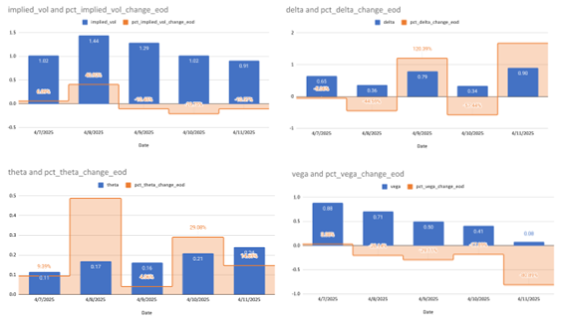
For more detail and complete EOD changes on Anna’s options position, refer to Figure 28 in the subsequent section.
UI/UX 5: Real Time Alerts & Cone of Accuracy
Real Time Alerts
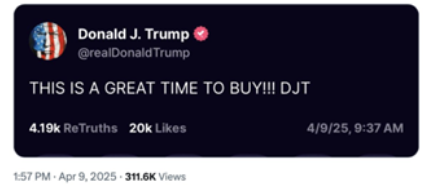
Figure 23
Note. From Houghtaling, E. Q. (2025, April 9)
On April 9th, Trump tweeted “It’s a good time to buy” and the market surged 9.5%, its largest one day rally since October 2008. All of a sudden, Anna’s options position was in the red, decreasing from $107 to -47$ in PnL by the end of the day.
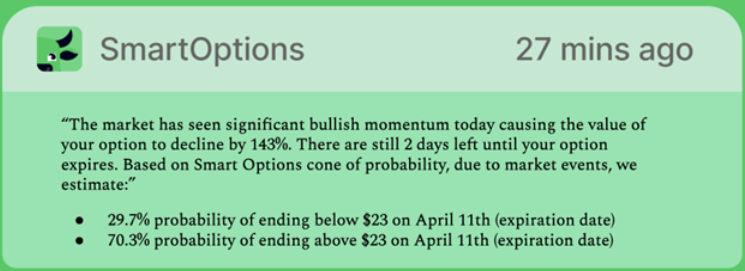
The SmartOptions platform sent Anna an alert push notification:
FIGURE 24: SmartOptions Push Notification
Note. From SmartOptions – conducted April 2025 by the SmartOptions Research Team
Cone of Accuracy
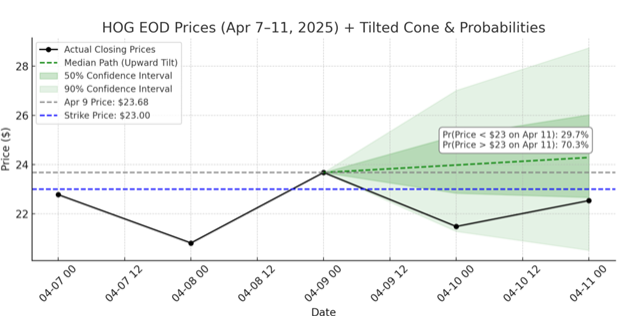
These probabilities are generated by a core SmartOptions feature known as the Cone of Accuracy. Powered by predictive machine learning algorithms trained on five years of ThetaData’s comprehensive historical and real-time market data (see Data Requirements section for details), the Cone dynamically estimates the probability of successful trade outcomes. Anna sees a live probability cone that continuously updates to reflect key market events, such as earnings announcements, interest rate changes, and other impactful factors, giving her a real-time forecast of her option’s likelihood of ending in-the-money (ITM). The visualization is clearly displayed on her screen, helping her make smarter, more informed decisions. Anna doesn’t like a 30% probability of ending below $23 so she decides to exit her option position.
FIGURE 25: SmartOptions Cone of Accuracy
 Note. Adapted from OpenAI (2024)
UI/UX 6: Trade Replays
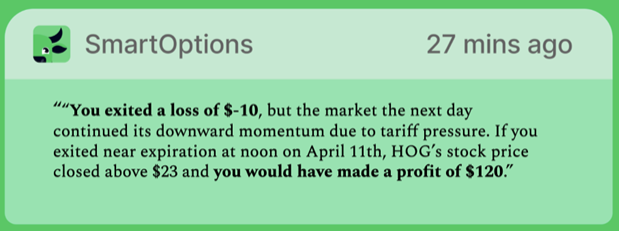
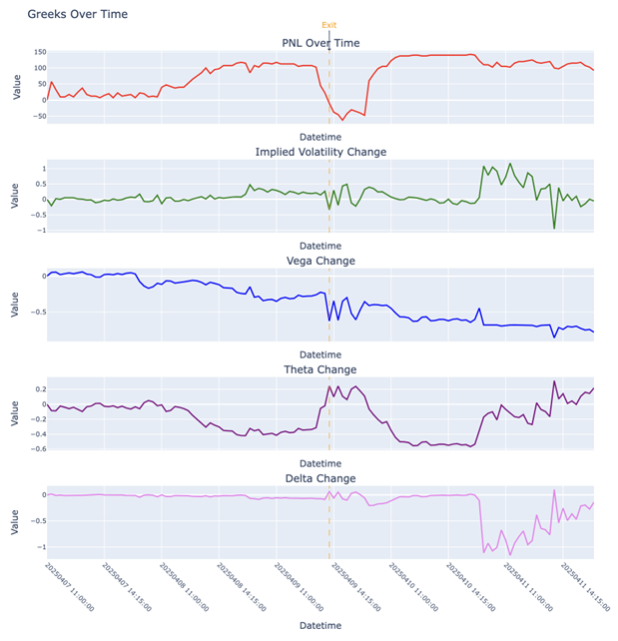
After Anna exits her position, SmartOptions presents her with the ability to see a full trade replay from the time she purchased her short call contract to the time she exited as well as time to expiration. The replay feature shows exact values and changes in Profit and Loss, Implied Volatility, Vega, Theta, and Delta. This gives her a better understanding of her potential profit and loss and how the option greeks impacted her position through the life of her trade. SmartOptions presents Anna with a notification indicating she would have made a profit if she didn’t panic during the market rally on April 9th.
FIGURE 26: SmartOptions Push Notification
Note. From SmartOptions – conducted April 2025 by the SmartOptions Research Team
FIGURE 27: SmartOptions PnL & Greeks Replays
Note. From SmartOptions – conducted April 2025 by the SmartOptions Research Team
In addition to an end-of-day update on the status of her PnL and Greeks, Anna will receive a replay of these daily changes at the end of her position’s expiration, depicted in Figure 28 below:
FIGURE 28: SmartOptions Greeks EOD Replay Updates
Note. From SmartOptions – conducted April 2025 by the SmartOptions Research Team
UI/UX 7: SmartEngine Spread Compression
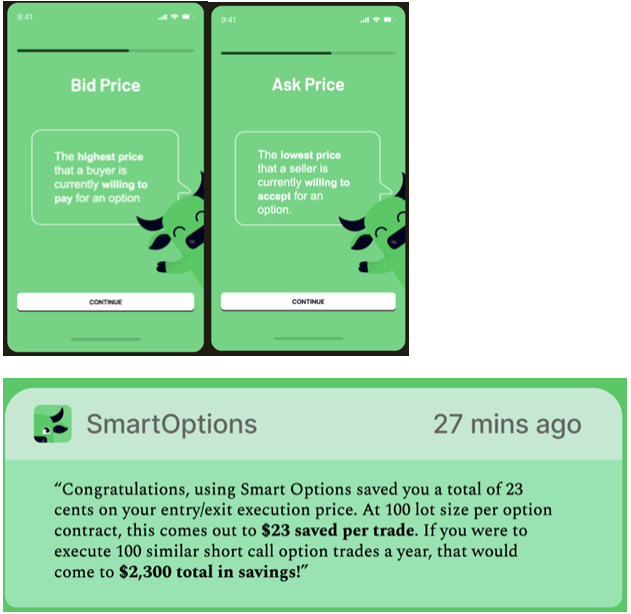
By taking advantage of SmartOptions’ “Execution Pillar” SmartEngine spread compression feature, Anna is able to see how much she saved in executing the purchase and sale of her option position. When Anna enters her position, she is Selling a Call Option, so she wants to sell to the bid, meaning she wants to sell at what someone is offering. When Anna exits her positions, she is Buying back her Call Option, so she wants to buy it back as cheaply as possible at the lowest ask price. Anna receives educational notifications on the difference between “Bid” and “Ask” prices along with how much she saved through SmartOptions’ SmartEngine.
FIGURE 29: SmartOptions Bid, Ask, and SmartEngine Notification
Note. From SmartOptions – conducted April 2025 by the SmartOptions Research Team
UI/UX 8: Badges and Leaderboard
Upon trade completion, Anna receives a badge for completing her first paper trade and a notification that she is on the Leaderboard to compare progress with her peers. The gamification elements directly reference SmartOptions’ “Education Pillar”, modeled after Duolingo, distinguishing SmartOptions through enhanced user engagement and continual learning reinforcement. She also receives AI-generated portfolio suggestions tailored to her risk profile, aligning with SmartOptions’ “Evaluation Pillar.”
FIGURE 30: SmartOptions Badge, Leaderboard, and Portfolio Notifications

Note. From SmartOptions – conducted April 2025 by the SmartOptions Research Team
This MVP experience introduces Anna to the fundamentals of options trading while reinforcing good habits through education, execution, and evaluation in a dynamic simulated environment, ultimately building confidence before real capital is deployed.
Continue to Part 5: Go-To-Market Strategy