
(And the prompt strategies that made the biggest impact)
If you’re a data professional, you probably have a graveyard of old SQL files scattered across your laptop – half-finished practice problems, window function experiments, forgotten course materials, interview questions you copied from somewhere, spreadsheets full of exercises, and mysterious .sql files you swear you didn’t name.
I had all of that… multiplied by ten.
And at some point, the mess was actively stopping me from leveling up. I didn’t want more SQL content – I wanted structure. I wanted everything I’d learned over the years to feel cohesive instead of fragmented.
So I tried an experiment:
What if I dumped all of my SQL files into ChatGPT, and used it to build a completely personalized SQL Mastery system?
Not generic content – but a curriculum based entirely on my own material and the areas I wanted to go deeper in.
This is exactly what happened, and the prompt strategy that made the biggest difference.
Step 1 – Start With the Most Important Prompt
The first thing I did was upload all my SQL materials – joins, CTEs, date functions, tricky interview queries, PDFs, datasets, everything.
Then I asked the single most important prompt of the entire project:
“From these SQL files, provide me a folder structure of the concepts … as a study reference.”
This did not generate new content. It did something far more useful:
- It mapped all the SQL concepts inside my files
- It revealed overlaps and gaps
- It created the blueprint for what later became my “SQL Master Pack”
This is now my #1 prompting rule:
Always ask for structure before content.
ChatGPT becomes dramatically more useful when it knows the shape of the information you have.
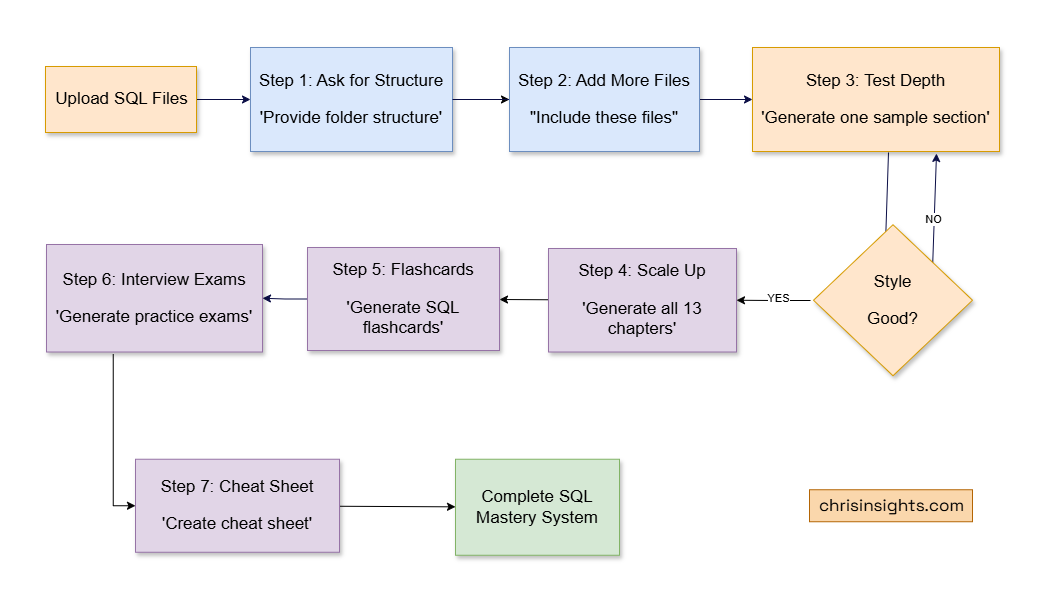
Step 2 – Add More Files Using a Consistent Prompt Pattern
I kept finding more files – join practice sets, recursive CTE experiments, indicator formulas, leetcode-style SQL problems, and even multi-week learning guides I’d forgotten about.
Every time, I asked the same thing:
“Ok great, now include these SQL files. I don’t need full output right now.”
That one phrase – “I don’t need full output right now” – kept the responses clean and kept building the conceptual map.
ChatGPT began to understand the breadth of the material:
- joins
- subqueries
- window functions
- date/time analytics
- indicators
- sessionization
- growth metrics
- KPIs
- interview puzzles
- schema design
- recursive patterns
- analytics engineering tasks
And it kept stacking that knowledge into the outline.
Step 3 – Deep Dive Into One Section First
Once I liked the structure, I tested the depth. I asked: “Generate one detailed sample section first.”
Then refined it:
“Even more explanation.”
“Make it both tutorial and technical.”
“Postgres examples.”
“I need this for all categories, not just CTE.”
This back-and-forth shaped the tone and depth of the entire book.
And the SQL examples weren’t trivial. I started seeing genuinely sophisticated patterns like:
Moving averages
AVG(value) OVER (
  ORDER BY date
  ROWS BETWEEN 6 PRECEDING AND CURRENT ROW
)
Gaps and islands
value - LAG(value) OVER (ORDER BY ts)Sessionization (30-minute inactivity rule)
CASE WHEN event_ts - LAG(event_ts)
         OVER (PARTITION BY user ORDER BY event_ts)
         > INTERVAL '30 minutes'
     THEN 1 END
Recursive CTE sequences
WITH RECURSIVE nums AS (
  SELECT 1
  UNION ALL
  SELECT n + 1 FROM nums WHERE n < 10
)
SELECT * FROM nums;
This wasn’t generic filler. It was the SQL I needed, at the depth I wanted.
Step 4 – Build All 13 Chapters of the SQL Master Pack
Once the style was dialed in, I scaled up:
“Generate 01_Foundations.md now.”
“Generate 02_Joins.md now.”
“Generate 03_Aggregations.md now.”
All the way to:
“Generate 13_Study_Guide.md now.”
The final Master Pack ended up with these 13 chapters:
1. Foundations
Basics, data types, constraints, PK/FK, SELECT.
2. Joins
Inner, left, right, full, anti-joins, semi-joins, multi-joins.
3. Aggregations
GROUP BY patterns, HAVING, conditional sums, distinct logic.
4. Subqueries & CTEs
Scalar, correlated, pipelines, recursive.
5. Date & Time
DATE_TRUNC, DOW logic, MoM/YoY, rolling windows.
6. Conditional Logic (CASE/COALESCE)
Segmentation, null-handling, safety patterns.
7. Set Operators
UNION/UNION ALL, INTERSECT, EXCEPT, NULL semantics.
8. DML & DDL
CREATE, ALTER, INSERT/UPDATE/DELETE, constraints.
9. Transactions & ACID
Isolation levels, race conditions, deadlocks.
10. Window Functions
Ranking, time-series analytics, deduping, partitions.
11. Interview Patterns
Top-N per group, sessionization, churn, cohorts.
12. Optimization & Performance
Indexes, execution plans, anti-patterns.
13. Study Guide
Consolidated review + drills.
This was the moment everything snapped into clarity. Years of fragmented SQL learning suddenly lived in one place.
Step 5 – Create Flashcards for Recall
Next, I wanted spaced repetition without manually building cards.
So I asked:
“Generate SQL flashcards.”
“A printable PDF sheet of flashcards.”
This generated a 150-card deck, everything from:
- what JOIN types do
- how window frames work
- differences between RANK and DENSE_RANK
- advanced CTE usage
- date/time extraction patterns
- performance heuristics
It saved me hours of manual prep.
Step 6 – Build Full SQL Interview Exams
I also wanted real assessment material, so I asked:
“A practice exam pack.”
“Option C.”
“Generate Exam 1.”
“Generate Exam 2.”
“Generate Exam 3.”
These weren’t toy questions. They covered everything companies actually test on.
Example from Exam 2:
Top 3 highest-paid employees per department:
ROW_NUMBER() OVER (
  PARTITION BY dept_id
  ORDER BY salary DESC
)
Example from Exam 3 (take-home-style):
Build a customer lifetime profile:
WITH summary AS (...)
SELECT ...
Example:
Compute 7-day rolling average DAU:
AVG(dau) OVER (
  ORDER BY day
  ROWS BETWEEN 6 PRECEDING AND CURRENT ROW
)
Example:
Detect churn (no activity for 30+ days):
event_date - LAG(event_date) > INTERVAL '30 days'This gave me real interview prep, not surface-level practice.
Step 7 – Finish With a One-Page SQL Cheat Sheet
My final prompt for the whole project was simple: “Cheat sheet.”
And ChatGPT pulled together:
- SQL execution order
- join patterns
- window function templates
- date bucket patterns
- interview tricks
- common anti-patterns
- optimization rules
- analytics patterns
Everything I wished I had in one printable page.
The Prompting Strategies That Made All the Difference
1. Ask for structure, not content, first
This sets the skeleton.
2. Use consistent prompts when expanding
The model will build a cleaner mental map.
3. Tune one section before scaling
Don’t generate all 13 chapters at once.
4. Use small corrective prompts
“More explanation.”
“More technical.”
“Make it Postgres.”
“Add examples.”
5. Let your files anchor the system
ChatGPT didn’t invent my curriculum. It organized and expanded the materials I already had.
The Final Result: A Complete SQL Mastery System
By the end of this process, I had:
- 13 polished SQL chapters
- 150+ flashcards
- 3 full SQL interview exams
- A professional cheat sheet
- Organized knowledge across dozens of advanced topics
- A workflow I can reuse for any technical topic
And maybe most importantly:
I understand SQL more deeply now than I did before.
Using ChatGPT wasn’t a shortcut – it was a catalyst for clarity, mastery, and structure.